

We have been using Basecamp for bugs and features tracking for a while, and we have realized that it doesn’t work well for us. We were struggling to make it work until we realized that we needed to search for another tool, since Basecamp is not suited for agile software development. I’ll be reviewing a series of applications in the next few weeks. The first up, Pivotal Tracker.
The features we miss
We have been using scrum for a while and we could not adapt it to Basecamp. It’s missing a few features that are basics for agile:
- Backlog — a place where we could store tasks that we are not working on currently
- Task states — we could not change the state of the tasks (started, accepted, delivered, etc)
- Prioritizing tasks — todo lists in Basecamp are not well suited for grouping tasks. If we add tasks to todo lists, we cannot prioritize them well, since some tasks in one todo list should have a higher priority than other tasks in another todo list
Not to mention that we don’t have burn-down charts, velocity, etc. These things are not top priority though.
Seeking a different issue tracker
The problem we had while searching for a different solution was that many systems out there try to improve things based on Basecamp. Then Petyo suggested that we try out Pivotal Tracker.
I had a look at and it seems that it is the closest solution to the agile principles and scrum I’ve seen so far.
Pivotal Tracker is much more complex than Sifter which I reviewed a week earlier (Review coming soon — Sifter’s biggest advantage is the simplicity, great dashboard, task type states and filters, though some features are missing like proper backlog). On the other hand, Pivotal Tracker has a very interesting approach to task management, and all the functionality needed to track tasks properly.
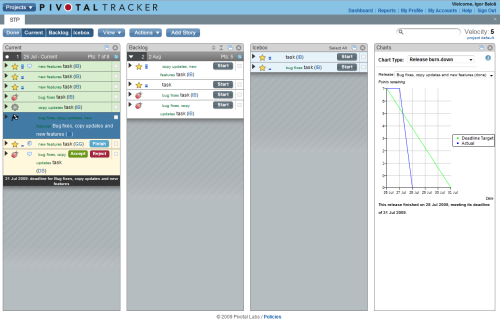
The main screen of Pivotal Tracker contains columns which can be changed based on what you need and want to see. Tasks are separated in iceboxes, backlog and current task list.
The good
Iceboxes
Iceboxes are place where you create tasks. In the icebox you have all the tasks that you plan to work on someday, and they are not ordered.
Backlog
Backlog contains all the tasks you plan to work on, but you did not start to work on yet. Backlog is ordered, and tasks can shift from it to current milestone dynamically.
Current tasks
The current tasks list is the place where you can find tasks which you are working on in the current iteration.
Velocity
One more interesting feature of Pivotal Tracker is velocity. It is the average number of points accepted per iteration, based on recently completed iterations. It measures progress, and allows Tracker to predict when milestones will be completed based on past performance.
Everything is in task lists
Pivotal Tracker is task oriented. Everything you need to see in Pivotal Tracker is related to tasks (releases, comments, backlog, current tasks) and can be seen in task lists named current, backlog, icebox etc. Even release date looks like a task. It is created in the same way as the tasks only it’s marked with a different type.
Not all tasks can have points in Pivotal Tracker, only features do, which is logical, since the estimates are related to the features, and when they will be finished, so bugs, chores do not have points.
Burn-down chart
Another great feature in Pivotal Tracker is the burn down chart which is generated automatically based on the work completed. It can be reviewed in the same way you would review tasks.
Search, group tasks
Pivotal Tracker also contains a way to have proper todo lists, by adding tags. Every task can have a tag which gives you an easy way of searching and grouping tasks.
Report generating
It contains simple report generating, although as far as we’ve seen, it’s disadvantage is that you can’t export them.
The bad
Well, on the bad side, Pivotal Tracker is strictly a tracker, so there is no way to use it for messaging, project specifications etc.. What we love about Basecamp is that you have separate sections like messaging and writeboards, which can be used for communication and project specifications. But when you take a closer look, that is not a purpose of Pivotal Tracker, it’s not meant to be used as an all-in-one solution.
One more thing to note is that Pivotal Tracker is complex at first glance at it and requires time to get used to it. It seems it’s developed in a way so you have to follow the rules, which is a good thing.
The feature we would miss most from Basecamp is the communication between more than one person on a task. Pivotal tracker has it but it works in a way that only the owner, requester and all members who have posted comments are emailed when a new comment is posted. There is no way to choose users to notify. Also reply from email would be nice. This is the feature we seek most, since this could make it hard for us to communicate with the client directly about a task.
I must say that Pivotal Tracker is interesting, and a nice approach to management. We are still reviewing it, and who knows, maybe this will be our next task management system.
Review is still in progress
We’re trying Pivotal Tracker on a small project for now to see if it fits. In the mean time, we’re also trying some others tools to get a feel of what is out there. It's almost impossible to tell if a tool is right unless you try it on a real project. Stay tuned for more reviews in the coming weeks.
We are in search of the good solution which could improve our process, feel free to recommend any other task management systems.